Detect / Malware Scanning
A WordPress malware scanner that shows you what it found
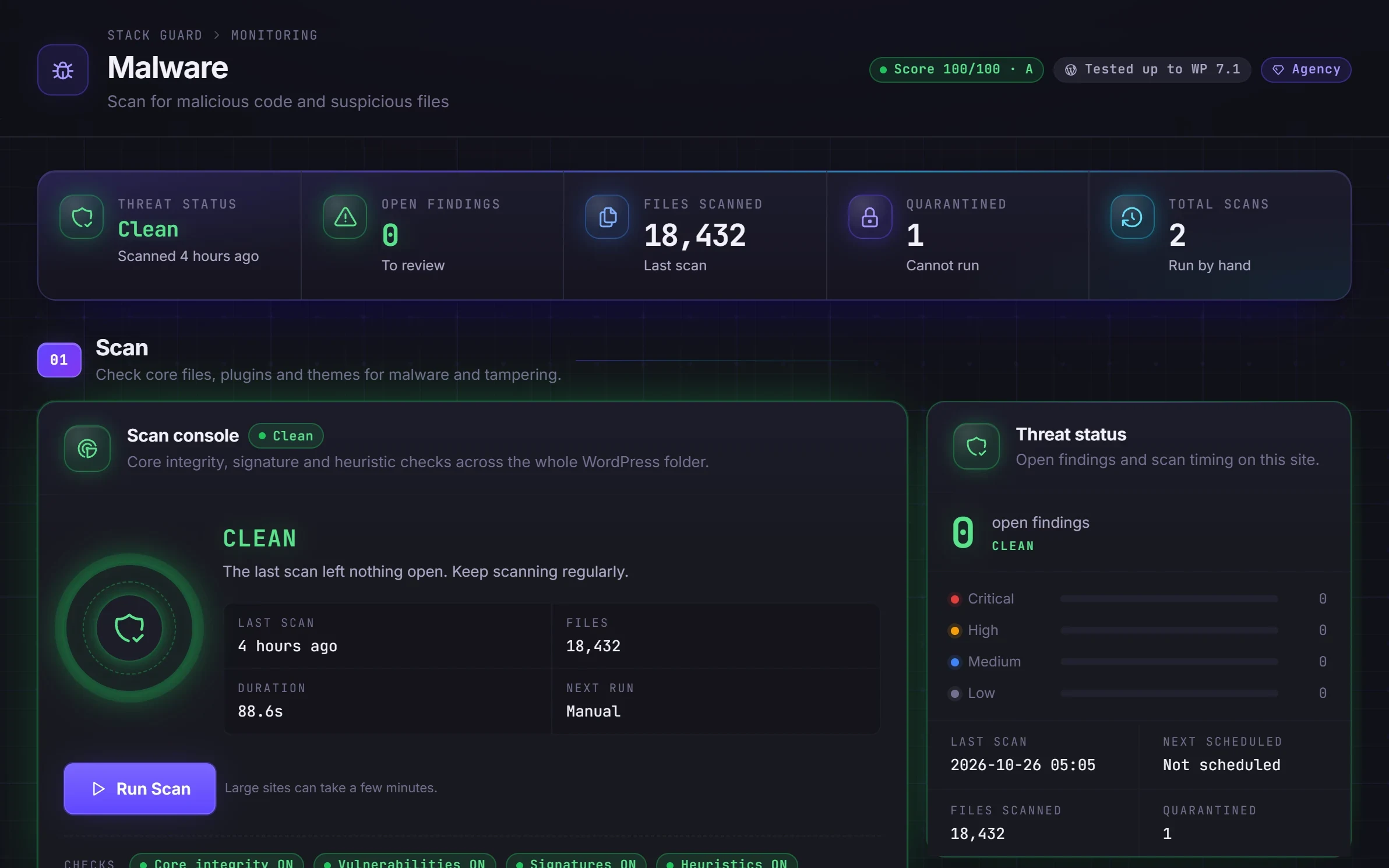
Stack Guard is a WordPress malware scanner that checks your files for malicious code and suspicious patterns, compares every core file against the official checksums, and reports each finding with how serious it is and what to do.
Why it matters
Why malware scanning matters
Signature and heuristic scans, a check of every WordPress core file against the official checksums, and a clear report of what was found and how serious it is.
Signatures and core integrity
Known malware signatures plus a check of every core file against WordPress.org, so a changed or extra file stands out.
Outdated plugins and themes
On Pro, the scanner flags plugins and themes that are several versions behind, because old versions are where known weaknesses live.
Quarantine, not panic
On Pro, move a bad file to quarantine, restore it if it was a false alarm, or restore a core file straight from WordPress.org.
Watch it work
Malware Scanning, recorded live
A real recording of Stack Guard on a demo site. Nothing staged; waiting time is cut out.
By plan
What each plan includes for malware scanning
Free
$0- Manual scans with a full report
- Malware signatures and core file integrity check
- Ignore or review each finding
Pro adds
From $95/yr- Scheduled scans
- A check that flags plugins and themes several versions behind
- Quarantine and restore, and core file restore from WordPress.org
Docs
Set it up in minutes
The same plain-language help that ships inside the plugin.
Malware scanner
Searches your site's files for malicious code, checks WordPress's own files against the official copies, and flags plugins and themes that are far behind on updates.
ReadFindings and quarantine
What to do with each scan finding: look at the file, move it safely out of the way, restore an original WordPress file, delete it, or mark it as harmless.
ReadWhat a WordPress malware scanner looks for
Malware is built to stay hidden. The site looks normal while it sends spam, steals data or redirects visitors. Typical finds are back doors, web shells, hidden redirects and injected code, plus changed WordPress core files and extra PHP files that have no business in a WordPress folder.
A scanner finds what you cannot see by browsing the site. It is one layer: it tells you something is wrong and where, so you can act.
How the Stack Guard malware scan works
Open the Malware tab and click Run Scan. Progress shows on the scan console. When it finishes, findings are sorted with the most serious first, and each shows the file, the rule that matched and when it was first found. Manual scans with the core, signature and heuristic checks are in every plan.
- Core file integrity: compares every WordPress file with the official copy for your version and language, and flags extra PHP files in the WordPress folders.
- Malware signatures: patterns of known back doors, web shells, hidden redirects and injected code. Uploads and cache folders and files over 5 MB are skipped.
- Heuristic analysis (optional): flags PHP files that look scrambled, with extremely long lines or random-looking text, which is how attackers hide code. It finds more but also flags some harmless files.
- Outdated plugin and theme check (Pro): flags plugins and themes several versions behind the latest release. It compares version numbers and does not look up a vulnerability database. A known vulnerability lookup is coming soon.
Deal with findings safely
Findings sit in three lists: Open, Quarantined and Ignored. Take a backup first, then open the finding and click View file to see where the match is.
For a changed WordPress core file, Restore original replaces it with the official copy and keeps your current file in the quarantine folder as a backup. For anything else you do not recognise, Quarantine moves the file into a locked folder where it cannot run and remembers where it came from, so you can put it back from the Quarantine vault. Delete removes a file for good. If a finding is a harmless file you trust, Ignore it; it is reported again if the file changes. Viewing and ignoring are in every plan, and quarantine, delete and restore original are Pro.
Files WordPress cannot run without, such as wp-config.php and index.php, are never moved or deleted. Finding malware means someone got in, so after cleaning, change passwords, rotate the security keys and update everything.
Scheduled scans, alerts and who this suits
On Pro, switch on Scheduled scans and choose daily, weekly or monthly with a day and time. Turn on the Malware Issues Found alert on the Notifications tab to get an email when something turns up. Manual scan policy only marks a scan as overdue on the Malware tab. It never starts one by itself.
Every WordPress site benefits from a regular scan, and it matters most on sites that run many plugins, take payments or hold client data. Stack Guard's security score rewards a scan in the last 7 days. Pair the scanner with file change monitoring and verified backups so you can both spot a change and undo it.
Questions
WordPress malware scanner: questions
How do I scan WordPress for malware?
Install Stack Guard, open the Malware tab and click Run Scan. The scan checks your files and core integrity and lists anything it finds, with severity and the file path. Pro can run scans on a schedule.
Is the Stack Guard malware scanner free?
Manual scans with a full report, malware signatures, the optional heuristic check and the core file check are free. Scheduled scans, the outdated plugin and theme check, quarantine and core file restore are Pro.
Will the scanner flag harmless files?
Sometimes, as every scanner does, and the optional heuristic check more so. Each finding can be reviewed and ignored, and the scanner shows the rule that matched so you can decide.
How often should I run a WordPress malware scanner?
At least weekly. Stack Guard's security score counts a scan in the last 7 days at full points and one in the last 14 days at half. Pro schedules daily, weekly or monthly scans so it happens without you.
Does the scanner check for known plugin vulnerabilities?
Not yet. On Pro it flags plugins and themes that are several versions behind, because old versions are where weaknesses live, but it compares version numbers rather than a vulnerability database. A known vulnerability lookup is coming soon.
Can the scanner clean a hacked site for me?
It helps with the first steps: restoring core files and quarantining suspicious ones on Pro. A hack means someone got in, so you also need to change passwords, rotate keys, update everything and find how they entered.
More in Detect
See trouble the moment it starts.
Put Stack Guard's malware scanning to work today.
Install Stack Guard Free in a minute, or go straight to Pro.