For Site Owners
WordPress security for small business, without the jargon
WordPress security for small business should not need a security team. Stack Guard shuts the doors attackers try first, tells you when something looks wrong, and keeps a backup you can restore. The essentials are free, and Pro costs under $8 a month.
Sound familiar?
The problems we hear most
You do not know if you are at risk
Your site works, so it feels fine. Most attacks are automatic and aim at every WordPress site they can find, so being small does not make you invisible.
Bots guess passwords all day
Automated programs try common usernames and passwords on the sign-in page, over and over. One weak password is all it takes.
Spam or redirects appear on your pages
Attackers who get in often add hidden links, fake pages or redirects that send your visitors somewhere else. You may be the last to notice.
Customer data is on the line
Contact forms, orders and user accounts live in your site. If someone gets in, that information can be taken, and your customers will want to know why.
A flagged site costs you trust
Google or your host can warn visitors away or suspend a site that has been compromised. Sales stop, and getting the warning removed takes time.
Cleanup is slow and stressful
Fixing a hacked site means finding what changed, removing it and hoping you got it all. Without a recent backup, it can mean starting over.
How Stack Guard helps
What changes with Stack Guard
Close the front door
Move your sign-in page to an address only you know, lock out anyone who keeps failing, and add two-factor so a stolen password is not enough. All of this is in the free plugin.
Learn moreFind trouble early
Scan for malware and check every WordPress core file against the official copies. Pro runs scans on a schedule and watches for files that change when they should not.
Learn moreAlerts you will actually read
Pro sends clear emails when something needs attention, plus a daily or weekly digest. Free already emails you when someone is locked out.
Learn more![Weekly digest: [Brightpeak Studio] Weekly Security Digest](/_next/image?url=%2Femails%2Fweekly-digest-dark.webp&w=3840&q=75&dpl=dpl_EnDDvyFkWaH3seN2sM9hMFHdkNps)
![Lockout alert: [{{site_name}}] An IP address was locked out](/_next/image?url=%2Femails%2Falert-ip_lockouts-dark.webp&w=3840&q=75&dpl=dpl_EnDDvyFkWaH3seN2sM9hMFHdkNps)
![Malware alert: [Brightpeak Studio] Malware scan finished: 1 issue found](/_next/image?url=%2Femails%2Fmalware-scan-dark.webp&w=3840&q=75&dpl=dpl_EnDDvyFkWaH3seN2sM9hMFHdkNps)
![File changes: [Brightpeak Studio] Files changed on your site](/_next/image?url=%2Femails%2Ffile-changes-dark.webp&w=3840&q=75&dpl=dpl_EnDDvyFkWaH3seN2sM9hMFHdkNps)
![Sign-in code: [Brightpeak Studio] Your verification code](/_next/image?url=%2Femails%2F2fa-code-dark.webp&w=3840&q=75&dpl=dpl_EnDDvyFkWaH3seN2sM9hMFHdkNps)
Undo the worst day
Make a full or database-only backup, and Stack Guard verifies it before it counts. Restore with one click, and roll back for seven days if you change your mind. Free includes all of it.
Learn moreOne score, in plain words
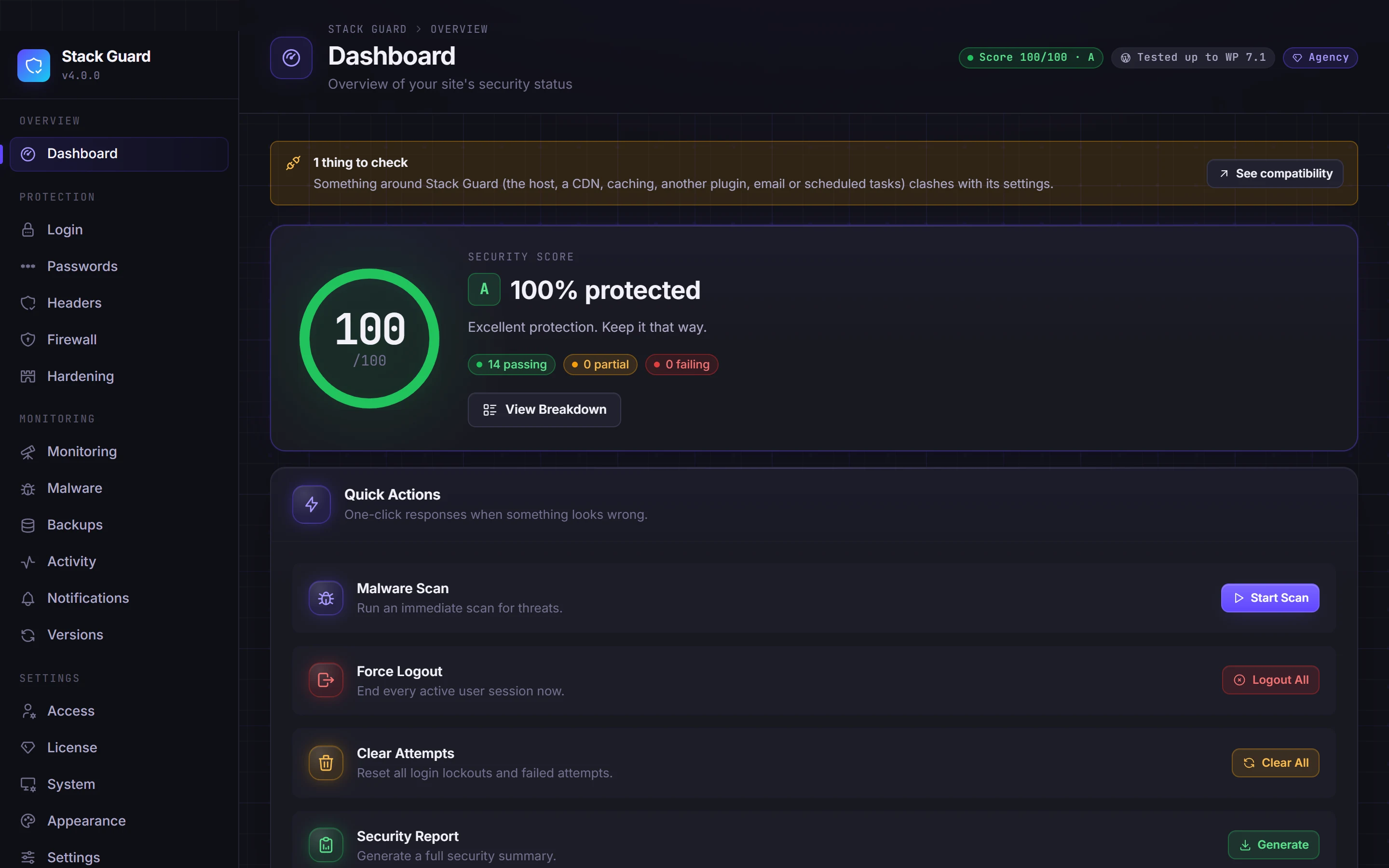
The dashboard gives your site a security score out of 100 from 14 checks, and built-in help explains every setting without jargon.
Learn moreWhat protection costs, per month
Pro is $95 a year for one site and renews at the same price. Spread over twelve months that is under $8. If you run a few sites, Pro 5 brings each one below $2.50 a month.
- Free, essentials on every site
- $0 a month
- Pro, 1 site ($95 a year)
- About $7.92 a month
- Pro 5, 5 sites ($145 a year)
- About $2.42 a month per site
- First purchase
- 14-day money-back guarantee
Why WordPress security for small business matters
Most attacks on small sites are not personal. Software scans the internet for WordPress sites, then tries the same set of tricks on each one: guessing passwords, probing for old plugins with known weaknesses and poking at features most sites never use.
When one of those tricks works, the damage tends to look the same. Spam pages or hidden links appear, visitors get redirected, customer details are exposed, or the site is used to attack others. Then a search engine or your host flags the site.
None of this needs you to be a target. It only needs a weak password, an unpatched plugin or a door you did not know was open.
- Automated password guessing on the sign-in page
- Injected spam, hidden links or redirects
- Stolen customer or contact form data
- A site flagged or suspended by Google or the host
What a hacked site really costs you
The cost is rarely a single bill. It is the days your site is down or warning visitors away, the sales and enquiries you miss, the time spent finding and removing what was added, and the customers who stop trusting you.
We are not going to quote scary statistics, because every site is different. The point is simple: preventing the problem is much cheaper than recovering from it, and a verified backup turns a disaster into an afternoon.
A simple path: install Free, then add Pro when you want it
Start with the free plugin. It needs no key and no sign-up, and it covers sign-in protection, two-factor, lockouts, a firewall, hardening, malware scans and backups with restore.
When you want Stack Guard to watch for you, add Pro. You get scheduled scans, file change monitoring, a check for plugins and themes that have fallen several versions behind, and the full set of alerts and digests.
Each setting is explained inside the plugin in everyday language, so you do not need to know what XML-RPC or a security header is before you switch it on.
- Install Stack Guard Free and open the dashboard
- Switch on the sign-in, two-factor and hardening essentials
- Take your first backup and check it shows as verified
- Add Pro when you want automatic scans and alerts
Questions
WordPress security for small business: questions
Do I need WordPress security for a small business site?
Yes. Attacks on WordPress sites are mostly automatic and do not check how big you are. Basic WordPress security for small business, such as a protected sign-in page, two-factor, lockouts and a working backup, removes the easy ways in.
Is the free version enough?
Free covers the essentials: sign-in protection, two-factor, lockouts, a firewall, hardening, manual malware scans and verified backups with restore. Pro adds automation, such as scheduled scans, file change monitoring, outdated plugin checks and full alerts.
How much does Pro cost?
Pro is $95 a year for one site, about $7.92 a month, and it renews at the same price. Pro 5 is $145 a year for five sites. There is a 14-day money-back guarantee on a first purchase.
Do I need to be technical to use it?
No. Every feature has a plain-language explanation inside the plugin, and the dashboard shows a security score so you can see what is still open. You can also read our guides for step-by-step help.
What if I get locked out of my own site?
Stack Guard includes recovery switches you can set in wp-config.php, and Pro adds a magic link so a locked-out person can free themselves by email. Your hosting provider or developer can add a switch in a minute.
What happens if my site is already hacked?
Start with our guide to recovering a hacked WordPress site. Stack Guard can scan for malware and check core files, and a verified backup from before the problem gives you something safe to restore.
Protect your site in an afternoon
Install Stack Guard Free, switch on the essentials and take your first backup. Add Pro when you want it to watch for you.