Protect / Passwords
A WordPress password policy without the nagging
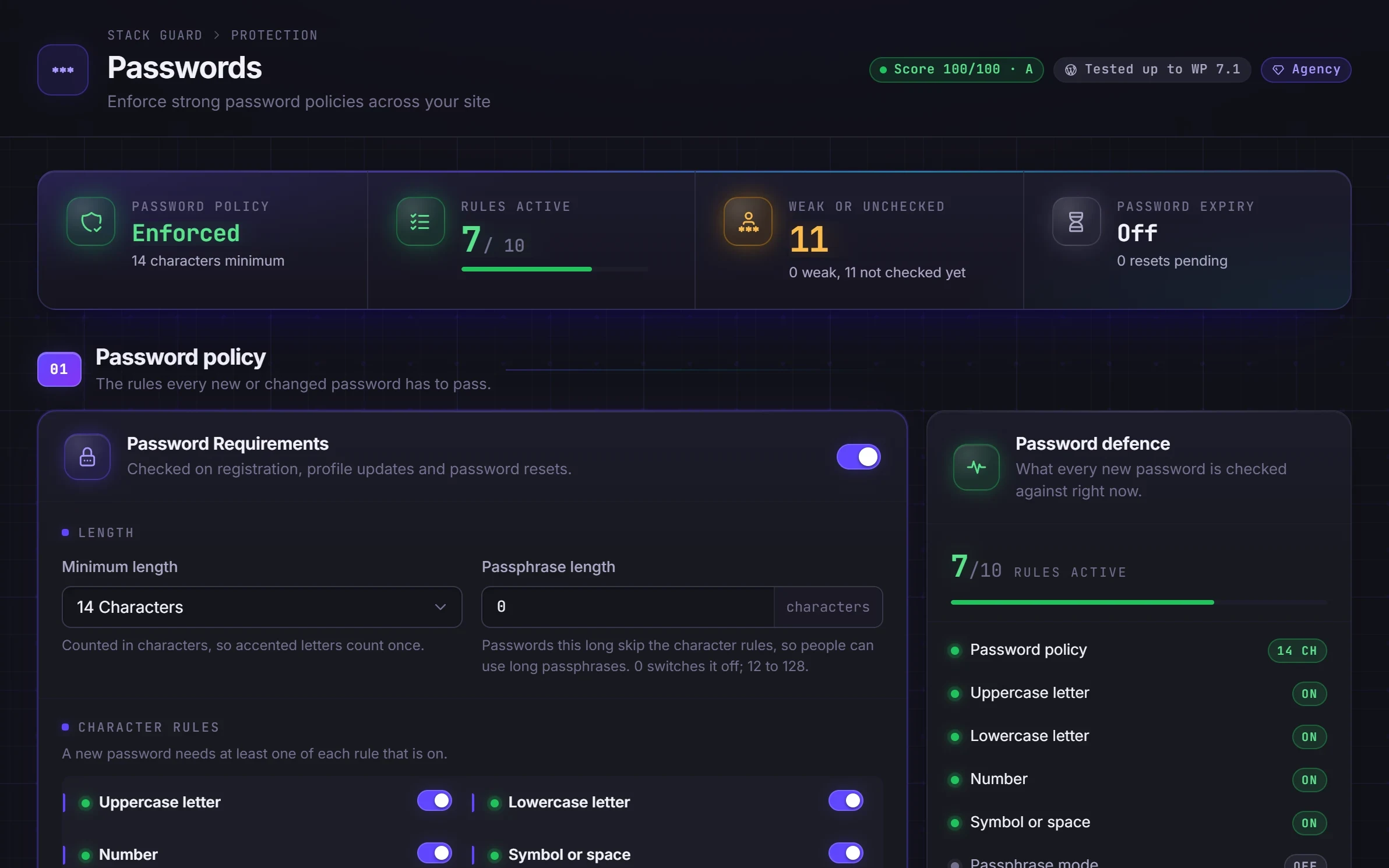
Weak and reused passwords are a common way WordPress accounts get taken. A WordPress password policy in Stack Guard sets clear rules for new passwords, refuses ones already leaked in breaches, and lets you force a reset when you need to.
Why it matters
Why passwords matters
Set the rules, refuse passwords that already appear in known breaches, and force a reset for everyone or just the accounts you are worried about.
Rules people understand
Minimum length, character rules or a long passphrase instead, shown clearly when someone picks a password.
Refuses leaked passwords
Checks new passwords against the Have I Been Pwned breach list without the password ever leaving your site.
Reset everyone in one click
On Pro, force a password change for every user or chosen users after a scare, with an email telling them why.
By plan
What each plan includes for passwords
Free
$0- Minimum length, character rules and passphrase length
- Breached-password check that never sends the password
- Password expiry
Pro adds
From $95/yr- Block passwords built from the person's own name or email
- Expiry exemptions by role and a reminder before expiry
- Forced password reset for all users or chosen users, with email
Docs
Set it up in minutes
The same plain-language help that ships inside the plugin.
Password rules
Sets the rules every new password must meet: a minimum length, the kinds of characters it needs, no personal details, and never a password already leaked in a data breach.
ReadPassword expiry
Asks people to choose a new password after a set number of days, with an optional reminder beforehand and roles you can leave out.
ReadForced password resets
Makes chosen users, or everyone, pick a new password the next time they sign in. Use it after a suspected break-in, a staff change or a new password policy.
ReadWhy a WordPress password policy matters
Attackers do not guess letter by letter. They try lists of real passwords that leaked from other sites, and a password on such a list falls in seconds, however clever it looks. Out of the box WordPress shows a strength meter but does not enforce a rule, so each person decides for themselves.
A policy makes the decision once, for everyone. Length is the biggest factor in a strong password, and a breach check removes the passwords attackers already have. Together they defeat those lists.
What the Stack Guard password policy checks
Whenever someone sets a password, on their profile, at registration or through a reset link, Stack Guard checks it against your rules and shows exactly what is missing so they can choose another. Password rules, including the breach check, are in every plan.
- Minimum length: 12 is a good balance, and 14 or more is better for administrators.
- Character rules: require an uppercase letter, a lowercase letter, a number and a symbol, each switched on or off.
- Passphrase length: a long password, such as four random words, can skip the character rules.
- Breached-password check: refuses any password found in the public list of leaked passwords. Only the first 5 characters of a one-way hash are sent to Have I Been Pwned, so the password never leaves your site. If the list cannot be reached, the password is allowed rather than blocking the person.
- Block personal information (Pro): refuses passwords built from the username, display name, name or the first part of the email address.
- A password generator in the side panel makes a random password that meets your rules.
Password expiry and forced resets
New rules only apply when a password changes, so existing weak passwords stay until you act. Password expiry, in every plan, asks people to choose a new password after 30 days up to a year. Where a password age is not known yet, the clock starts at the next sign-in, so switching it on never locks everyone out at once. Pro adds exemptions by role, for example a shared kiosk account, and a reminder before the deadline.
Current advice favours long, unique passwords over frequent changes, so unless a contract or insurer asks for regular changes, a long interval such as a year is enough.
Forced resets are Pro. Force everyone (optionally leaving out administrators), pick specific users, or target people whose password was set before your rules. A forced reset marks the account, and at their next sign-in the person can only reach their profile until they set a new password. You can see who is still pending, resend the email or cancel. A reset does not sign anyone out, so after a suspected break-in also use Force Logout on the Dashboard or Sign Out Everywhere on the Access tab.
Roll out a policy people will follow
Prefer length over complexity: a 20 character passphrase beats a short password full of symbols, and it is easier to remember. Set a stricter minimum for administrators, switch on the breach check, and pair the policy with two-factor so a leaked password is not the end of the story.
If you have a custom login URL, tell people the right address separately, because forced reset emails link to the standard WordPress sign-in address.
Questions
WordPress password policy: questions
How does the breached-password check keep passwords private?
Stack Guard sends only the first five characters of a one-way hash of the new password to Have I Been Pwned and compares the matches on your server. The password itself never leaves your site.
Should I make WordPress passwords expire?
Expiry helps on sites with many users or strict rules. Stack Guard Free can expire passwords; Pro adds role exemptions and a reminder before the deadline so nobody is caught out.
Can I force all users to reset their password?
Yes, on Pro. Force a reset for everyone or for chosen users, optionally excluding administrators, and send them an email. They must choose a new password at their next sign-in.
Is the WordPress password policy free in Stack Guard?
Yes. Minimum length, character rules, passphrase length, the breached-password check and password expiry are in Free. Blocking personal information, expiry exemptions and reminders, and forced resets are Pro.
How long should a WordPress password be?
Length matters most. Stack Guard suggests a minimum of 12 as a good balance and 14 or more for administrators, and a passphrase length such as 20 lets people skip the character rules.
Does the policy check passwords that already exist?
Not until they change. To make everyone choose a new one now, use a forced reset on Pro, which can also target accounts whose password was set before your rules.
More in Protect
Shut the doors attackers try first.
Put Stack Guard's passwords to work today.
Install Stack Guard Free in a minute, or go straight to Pro.