Manage / Compatibility Check
Find WordPress security plugin conflicts before they lock you out
Security plugins fail quietly when a cache serves the sign-in page or a CDN hides the real visitor address. Stack Guard's compatibility check finds these WordPress security plugin conflicts and tells you exactly what to change.
Why it matters
Why compatibility check matters
Stack Guard checks for the things that quietly break security plugins: proxies, cached sign-in pages, other security plugins, page builders and email delivery. Each finding says what to do.
Finds silent conflicts
Proxy and CDN addresses, cached sign-in pages, cache plugins and host caches, other security plugins, page builders with an enforced CSP, nginx and .htaccess, and email delivery.
Reads Cloudflare for you
On Pro, a read-only Cloudflare token lets Stack Guard check SSL mode, HSTS, APO, cache rules and firewall rules.
Keeps you current
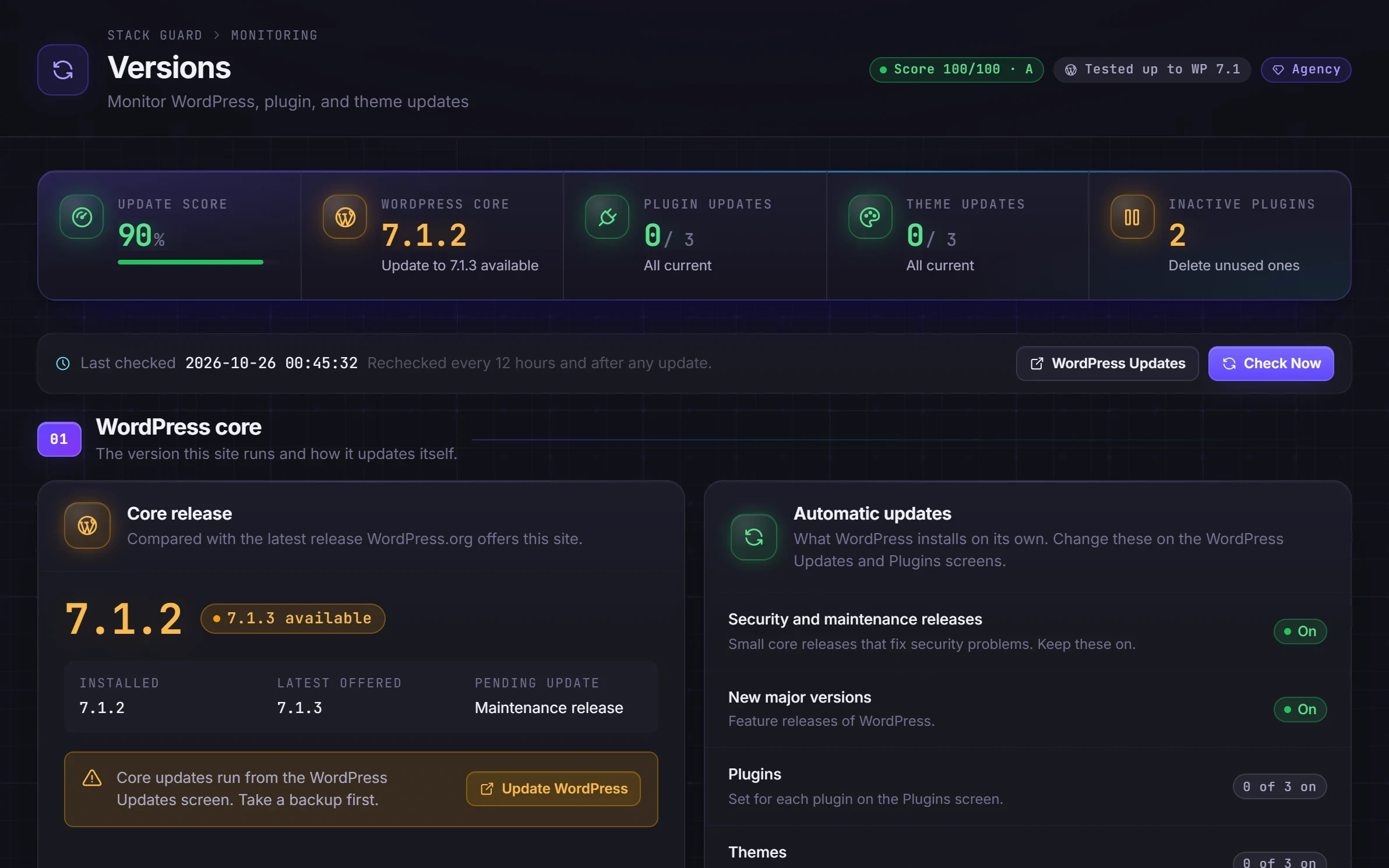
The Versions screen shows WordPress, plugin, theme and PHP status, including PHP security support dates.
By plan
What each plan includes for compatibility check
Free
$0- Checks for proxies and CDNs, caching, other security plugins, page builders, server type, email delivery and scheduled tasks
- Versions overview for WordPress, plugins, themes and PHP support dates
- System information
Pro adds
From $95/yr- Reads your Cloudflare settings with a read-only token: SSL mode, HSTS, cache rules and firewall rules
Docs
Set it up in minutes
The same plain-language help that ships inside the plugin.
Compatibility check
Stack Guard looks at what sits around it (a CDN such as Cloudflare, the host, caching, other security plugins, Jetpack, shops, page builders, email and scheduled tasks) and tells you which of its settings would clash, and what to do.
ReadSoftware versions and updates
One screen listing WordPress, every plugin, every theme and your server software, with what needs an update, what has automatic updates on, and whether your PHP version still gets security fixes.
ReadSystem information
Facts about your site and server in one place: Stack Guard, WordPress, PHP, the database, the web server and how much space each part uses. Copy it all in one click for a support request.
ReadWhy WordPress security plugin conflicts happen
Most problems after installing a security plugin come from what sits around it, not from the plugin itself. A CDN hides visitor addresses, so lockouts hit everyone at once. A cache serves a stale sign-in page. Two security plugins lock out the same user. Email never arrives with an unlock link.
These are hard to spot because nothing shows an error. Protection simply does not work the way you think it does. Finding them before you turn protections on avoids locking out real people.
What the Stack Guard compatibility check tests
Open the System tab and the compatibility check runs a test request in the background: one request to your home page and one to your sign-in address, from your site to itself. The check lists each finding with what was found, what to do and how it was found, so you can judge it yourself. Conflicts come first, and when there is one the Dashboard shows how many things need a check.
- Whether visitor addresses are read correctly behind a proxy or CDN.
- Security headers your host or CDN already sends.
- Whether the sign-in page is cached, and which cache plugins or host caches are active.
- Other security plugins.
- Jetpack with XML-RPC blocked.
- Shops with country blocking or firewall rules on.
- Page builders with an enforced Content Security Policy.
- nginx servers, and hosts with their own sign-in limits.
- Email delivery and scheduled tasks.
Cloudflare checks on Pro
With Pro, the check reads your Cloudflare zone instead of guessing from headers: the SSL mode, Always Use HTTPS, the minimum TLS version, HSTS, APO, cache rules that may cover the sign-in page, Bot Fight Mode and custom firewall rules. Flexible or off SSL is flagged as a conflict, because passwords travel unencrypted between Cloudflare and your server.
You create a read-only token. It is stored encrypted, never shown again, never exported and removed when Stack Guard is deleted. Stack Guard never changes anything at Cloudflare, and anything the token cannot read is listed as Unknown with the permission to add.
Run the check at the right time
Run it before you switch on the custom login URL, country blocking or an enforced Content Security Policy, and again after changing your host, CDN or a cache plugin. Click Check Again to refresh. Results are kept for 12 hours and checked again after a plugin or theme change.
The check only reads and advises. It never changes another plugin, your host or your CDN, and when something cannot be checked it says Unknown instead of guessing. It is in every plan.
Two companion screens help too. The Versions tab lists WordPress, every plugin and theme and your server software, with what needs an update and the date your PHP version stops getting security fixes. There is deliberately no update everything button, because one bad update can break a site. System information gives you the details support asks for in one copy.
Questions
WordPress security plugin conflicts: questions
Does Stack Guard work with WooCommerce and page builders?
Yes. The compatibility check knows about shops and page builders, and warns you when a setting like country blocking, firewall rules or an enforced Content Security Policy could affect them.
Can I run Stack Guard with another security plugin?
It is possible, but overlapping features conflict. The compatibility check detects other security plugins and tells you which settings overlap.
Does the Cloudflare check change my Cloudflare settings?
No. It uses a read-only token you create, only reads settings, and marks anything the token cannot read as unknown.
Is the compatibility check free in Stack Guard?
Yes. The check, the Versions screen and system information are in every plan. Reading your Cloudflare settings with a token is Pro.
How do I get Stack Guard to see the real visitor IP behind Cloudflare?
Open the Firewall tab and check Real visitor IP. Auto, the recommended mode, recognises Cloudflare and private networks, and a read-out shows the address Stack Guard sees so you can compare it with a what-is-my-IP site. The compatibility check also flags it when addresses look wrong.
Can a cache plugin cause WordPress security plugin conflicts?
If a cache serves a stored copy of your sign-in page, forms and security checks can fail or behave oddly. The compatibility check looks for cache plugins and host caches and tells you what to do.
Put Stack Guard's compatibility check to work today.
Install Stack Guard Free in a minute, or go straight to Pro.