Manage / Dashboard and Security Score
A WordPress security dashboard that scores your site
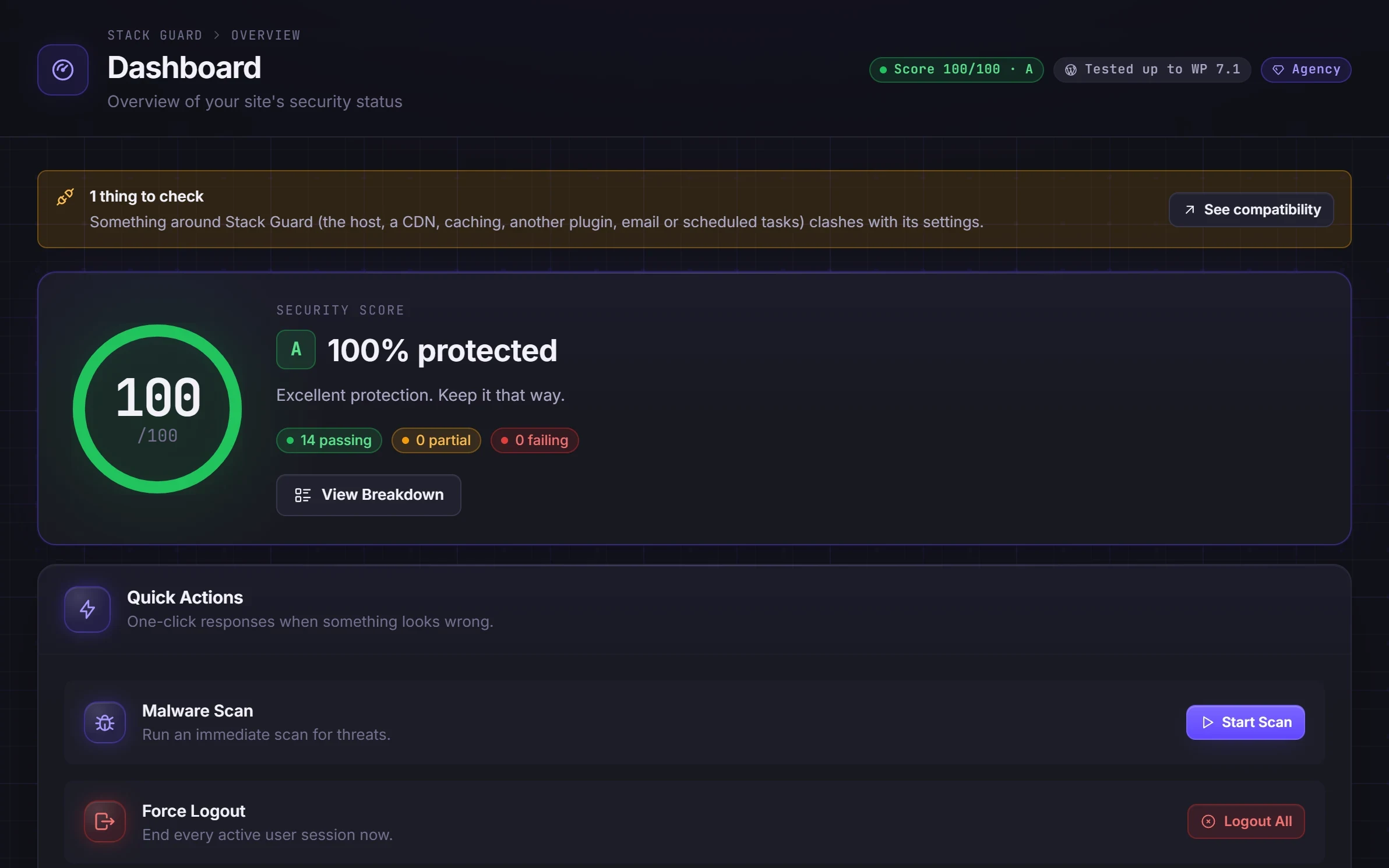
Stack Guard's WordPress security dashboard scores your site out of 100 from real checks, not marketing. It shows what is passing, what is not, and the single best thing to fix next.
Why it matters
Why dashboard and security score matters
A score out of 100 built from real checks, module cards that show what is on, an admin bar indicator and a WordPress dashboard widget. Built-in docs explain every feature in plain language.
A score built from real checks
Two-factor for admins, a custom login URL, strong passwords, breach checks, headers, hardening switches, scans and more.
Always the next step
The dashboard names the next fix and links straight to the setting, with plain-language docs beside it.
Visible everywhere
An admin bar indicator and a WordPress dashboard widget keep your score in front of you without opening the plugin.
By plan
What each plan includes for dashboard and security score
Free
$0- Security score from 14 checks
- Admin bar indicator and dashboard widget
- Plain-language docs for every feature, inside the plugin
- Settings export and import, reset to defaults
Pro adds
From $95/yr- Quick actions from the dashboard
- Pro checks counted in the score
Docs
Set it up in minutes
The same plain-language help that ships inside the plugin.
Dashboard and security score
The Dashboard gives your site a security score out of 100, shows what is happening right now, and tells you which single change would raise the score most.
ReadExport and import settings
Save all Stack Guard settings to a file as a backup, or copy a proven setup from one site to another in a minute.
ReadData retention and removal
How long Stack Guard keeps each kind of record, when it tidies up, and exactly what is removed if you delete the plugin.
ReadRecovery switches
Three emergency switches you add to wp-config.php when a protection keeps you out of your own site. They turn the protection off until you remove the line.
ReadWhat a WordPress security dashboard should show
Security has many parts and it is easy to forget one. A good dashboard turns them into one number you can check in a few seconds, shows what is happening right now, and tells you what to do next.
Stack Guard's dashboard is the first screen when you open the plugin. Below the score you see live counts: addresses locked out right now, active bans, sign-in attempts in the last 24 hours and when your security keys were last changed.
How the Stack Guard security score is worked out
The score adds up fourteen checks worth 100 points. A score of 80 or more is grade A, 60 or more is B, 40 or more is C, and anything lower is D. It is worked out on each page load from your saved settings and records, so it is always current and nothing extra is stored.
- Two-factor for all administrators: 15 points, or 8 if only some use it.
- File monitoring on with a baseline: 15 points, or 8 without a baseline (Pro).
- No open malware findings: 15 points, or 8 if none are critical or high.
- A custom login address: 10 points.
- A minimum password length: 10 points.
- The breached-password check: 10 points.
- Security headers: 10 points.
- A malware scan in the last 7 days: 10 points, or 5 within 14 days.
- Your AUTH_KEY set and long enough: 5 points.
- Blocking user enumeration and the remaining checks complete the fourteen.
Use Fix Next, the breakdown and the admin bar
Click View Breakdown to see each check, its points and a link to the tab that controls it. Click Fix Next to go straight to the missing check worth the most points. Come back after each change: the score updates on the next page load.
Three checks are Pro: file monitoring, disabling application passwords and the cross-origin headers. On Free they show a PRO mark and earn no points, so a Free site can reach 83, which is still grade A. The admin bar indicator and the WordPress dashboard widget are in Free, and a Docs tab inside the plugin explains every feature in plain language.
Settings export and import and a reset to defaults are here too. Export is handy for agencies: tune one site, then copy the setup to the next.
Quick actions and the security report
Pro adds quick actions to the dashboard, and they need full access to Stack Guard.
- Malware Scan: start a scan without leaving the dashboard.
- Force Logout: sign every user out of every device. You are asked twice, and the second question lets you stay signed in yourself. Use it after a suspected break-in.
- Clear Attempts: forget every failed sign-in and lift all lockouts.
- Security Report: a summary of the score, sign-ins over the last 7 days, malware, bans and two-factor use, with a button to copy it for an email or a ticket. It is built in your browser and nothing is sent anywhere.
- Client-ready security reports for Agency plans are coming soon.
Questions
WordPress security dashboard: questions
How is the Stack Guard security score calculated?
From 14 weighted checks worth 100 points, such as two-factor for all administrators, the custom login URL, breached-password checks, security headers, hardening switches and a recent malware scan. Pro-only checks show as locked on Free.
Can I reach 100 on the free version?
Free can reach 83, grade A. The last points come from Pro checks: file monitoring, disabling application passwords and cross-origin headers.
Is there documentation inside the plugin?
Yes. A Docs tab with plain-language help for every feature ships inside Stack Guard, with search and links to the right settings.
Is the WordPress security dashboard free in Stack Guard?
Yes. The score, the live counts, the admin bar indicator, the dashboard widget and the docs are in every plan. Quick actions and Pro checks counted in the score are Pro.
Does a score of 100 mean my site is secure?
No score can promise that. It shows whether the protections Stack Guard can check are switched on and working. You still need updates, good backups and careful access, and the dashboard points you to the gaps.
Can I copy my settings to another site?
Yes, in every plan. Export Settings downloads a file and Import Settings applies it on another site. Secrets and site-specific values such as the licence, API keys, login slug and allow list are never exported.
Put Stack Guard's dashboard and security score to work today.
Install Stack Guard Free in a minute, or go straight to Pro.